After a long break while we got EF 4.1 (Magic Unicorn Edition) polished up and shipped it felt like time to get some content up on here again. We’ve released some good introductory content for EF 4.1 on the MSDN Data Developer Center so I thought I’d dive into something a little more advanced.
The default Code First workflow that is seen in most walkthroughs gently encourages you to write your model configuration code in a way that takes advantage of inbuilt model caching. This is a good thing because the pipeline that processes conventions, data annotations and fluent API calls is pretty expensive. The model for a derived context type is cached at the AppDomain level and is built on the assumption that the context is always used to access the same set of tables. This is fine for most folks but if you have a multi-tenant database then you may have code executing in a single AppDomain that wants to use the same Code First context to access different groups of tables representing multiple instances of the same model.
The Model
The model we will be working with is very simple:
public class Person
{
    public int Id { get; set; }
    public string Name { get; set; }

    public virtual ICollection<ContactInfo> ContactInfo { get; set; }
}

public class ContactInfo
{
    public int Id { get; set; }
    public string Details { get; set; }

    public int PersonId { get; set; }
    public virtual Person Person { get; set; }
}
We are going to use different database schemas to distinguish each tenant. An example database with two tenants looks something like this:
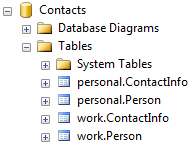
The API
The public surface of our API is shown below, we have a derived context and two static methods that allow us to provision a new tenant and create a context to access a given tenant.
public class ContextContext : DbContext
{
    public DbSet<Person> People { get; set; }
    public DbSet<ContactInfo> ContactInfo { get; set; }

    /// <summary>
    /// Creates a context that will access the specified tenant
    /// </summary>
    public static ContextContext Create(string tenantSchema, DbConnection connection)
    {
        // TODO: Implement
    }

    /// <summary>
    /// Creates the database and/or tables for a new tenant
    /// </summary>
    public static void ProvisionTenent(string tenantSchema, DbConnection connection)
    {
        // TODO: Implement
    }
}
The Implementation
Here is a complete code listing of our context, the implementation is explained in the next section.
public class ContactContext : DbContext
{
    private ContactContext(DbConnection connection, DbCompiledModel model)
        : base(connection, model, contextOwnsConnection: false)
    { }

    public DbSet<Person> People { get; set; }
    public DbSet<ContactInfo> ContactInfo { get; set; }

    private static ConcurrentDictionary<Tuple<string, string>, DbCompiledModel> modelCache
= new ConcurrentDictionary<Tuple<string, string>, DbCompiledModel>(); /// <summary> /// Creates a context that will access the specified tenant /// </summary> public static ContactContext Create(string tenantSchema, DbConnection connection) { var compiledModel = modelCache.GetOrAdd( Tuple.Create(connection.ConnectionString, tenantSchema), t => { var builder = new DbModelBuilder(); builder.Conventions.Remove<IncludeMetadataConvention>(); builder.Entity<Person>().ToTable("Person", tenantSchema); builder.Entity<ContactInfo>().ToTable("ContactInfo", tenantSchema); var model = builder.Build(connection); return model.Compile(); }); return new ContactContext(connection, compiledModel); } /// <summary> /// Creates the database and/or tables for a new tenant /// </summary> public static void ProvisionTenant(string tenantSchema, DbConnection connection) { using (var ctx = Create(tenantSchema, connection)) { if (!ctx.Database.Exists()) { ctx.Database.Create(); } else { var createScript = ((IObjectContextAdapter)ctx).ObjectContext.CreateDatabaseScript(); ctx.Database.ExecuteSqlCommand(createScript); } } } }
The Explanation
What exactly is that code doing?
- Constructor
- We’ve made the constructor private to force consumers to use the Create factory method.
- We are using the base constructor that accepts a compiled model and connection, this bypasses the usual OnModelCreating workflow and forces the context to run with the specified model and connection.
- The contextOwnsConnection flag indicates whether or not the connection should be disposed when the context is disposed. You’ll see in the sample usage that I used the same connection instance to access multiple tenants so I don’t want this behavior.
- Static modelCache Field
- We already know that model creation is expensive so don’t want to recreate the model for every context instance. This field will be used to cache models based on the connection string and tenant schema.
- Obviously the connection string based caching is a little flaky, feel free to substitute Server/Database name or whatever works in your scenario.
- Static Create Method
- This method houses the primary logic that allows us to target multiple tenants.
- We check to see if there is a model already created to access the tenant on this connection string. If not we use the DbModelBuilder –> DbModel –> DbCompiledModel workflow to create a model. This workflow is usually handled internally by DbContext.
- If you look at the API on DbModel you may be wondering what you can achieve by us having separated DbModel and DbCompiledModel… the answer in EF 4.1 is ‘absolutely nothing’! However, the longer term plan is to have DbModel be a mutable object model giving you much finer grain control once you are done with DbModelBuilder.
- You’ll notice I am removing ‘IncludeMetadataConvention’ from the conventions, this removes the EdmMetadata table that Code First includes by default.
- Provider information is required to build the final model because the database part will vary depending on the database provider being used. There is an overload of DbModel.Build that will accept raw provider information but we are using a handy overload that will work out these things based on the DbConnection.
- You’ll notice (probably with some dismay) we need to write code to configure the table schema for each entity. Admittedly there aren’t many magic unicorns grazing around this code… in future versions of EF we will be able to replace this with a much cleaner custom convention.
- Static ProvisionTenant Method
- This is pretty self explanatory, if the database doesn’t exist then we create it along with the schema for the new tenant. If the database does exist then we pull out the create script and run it against the existing database.
The Usage
Does it work? Of course…
using (var connection = new SqlConnection(@"Server=.\SQLEXPRESS;Database=Contacts;Trusted_Connection=True;"))
{
    ContactContext.ProvisionTenant("personal", connection);
    ContactContext.ProvisionTenant("work", connection);

    using (var ctx = ContactContext.Create("personal", connection))
    {
        ctx.People.Add(new Person { Name = "Rowan Miller" });
        ctx.SaveChanges();
    }
}
The Problem
Database schemas work fine as a way to differentiate each tenant. Another common practice is to use table prefixes and this hits a bit of an issue. Code First generates names for things such as foreign key constraints and there is no way to change these names. The generated names are often based on the entity type names and you end up with conflicts between two tenants. Unfortunately the only solution at this stage is to manipulate the generated sql script before executing it in the ProvisionTenant method… admittedly that is a pretty ugly solution.
The Summary
You can use Code First to access a multi-tenant database that uses database schemas to differentiate between each tenant. Table prefixes are possible but requires some ugly code.

