EF CTP4 Tips & Tricks: Code First Inheritance Mapping
This is post #7 in a series about the recently released Entity Framework Feature CTP4, also known as “EF Magic Unicorn Edition”.
In this post we are going to take a look at different options for the shape of the table(s) that store entities in an inheritance hierarchy.
Disclaimer: The Fluent API for mapping to a database schema, inheritance mapping in particular, is pretty horrible definitely not intuitive or concise in CTP4 and is something our team is currently working to improve. (i.e. this code is all going to change, for the better, in the next release)
The Model
First lets take a quick look at the model we are going to use for this post, it’s pretty simple and has two classes that participate in an inheritance hierarchy. We’ve then defined a derived DbContext and overridden the OnModelCreating method so that we can use the Fluent API to customize our mapping.
public class ProductContext : DbContext
{
public DbSet<Product> Products { get; set; }
protected override void OnModelCreating(ModelBuilder modelBuilder)
{
// TODO: Insert Custom Mapping Code
}
}
public class Product
{
public int ProductId { get; set; }
public string Name { get; set; }
public decimal UnitPrice { get; set; }
}
public class DiscontinuedProduct : Product
{
public DateTime DiscontinuedDate { get; set; }
}
Default (TPH)
Of course we aren’t forced to explicitly do any mapping to be able to persist data, if we chose not to do anything then Code First will default to use the Table Per Hierarchy (TPH) strategy. TPH basically equates to “store all my data in one table and use the values from one or more columns to identify which type each row is”. By default Code First will create a separate ‘Discriminator’ column to identify which type each row is, the class name is used as the value in this discriminator column.
Here is what our default schema looks like:
And here is some sample data from the table:

Table Per Hierarchy (TPH)
We can also explicitly configure TPH so that we have more control over column names etc. Here we are specifying that the discriminator column is called ‘Type’ and the value for Product is ‘P’ and DiscontinuedProduct is ‘D’.
public class ProductContext : DbContext
{
public DbSet<Product> Products { get; set; }
protected override void OnModelCreating(ModelBuilder modelBuilder)
{
modelBuilder.Entity<Product>()
.MapHierarchy()
.Case<Product>(p => new
{
p.ProductId,
p.Name,
p.UnitPrice,
Type = "P"
})
.Case<DiscontinuedProduct>(d => new
{
d.DiscontinuedDate,
Type = "D"
})
.ToTable("dbo.Products");
}
}
Our schema now looks like this:
And our sample data looks like this:
Table Per Type (TPT)
Table Per Type basically equates to “store all the data for properties on the base type in a single table, store any additional data for derived types in an extra table that has a foreign key to the base table”. Here is the code:
public class ProductContext : DbContext
{
public DbSet<Product> Products { get; set; }
protected override void OnModelCreating(ModelBuilder modelBuilder)
{
modelBuilder.Entity<Product>()
.MapHierarchy(p => new
{
p.ProductId,
p.Name,
p.UnitPrice,
})
.ToTable("dbo.Products");
modelBuilder.Entity<DiscontinuedProduct>()
.MapHierarchy(d => new
{
d.ProductId,
d.DiscontinuedDate,
})
.ToTable("dbo.DiscontinuedProducts");
}
}
Our schema now looks like this:
And our sample data looks like this:
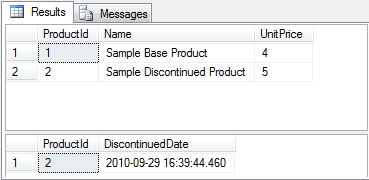
Table Per Concrete Class (TPC)
TPC means “Create a completely separate table for each non-abstract type in my hierarchy”. The code for this is shown below, note that because there is no foreign key between the two tables we need to take care of providing unique keys, therefore we are switching off identity on the primary key property.
public class ProductContext : DbContext
{
public DbSet<Product> Products { get; set; }
protected override void OnModelCreating(ModelBuilder modelBuilder)
{
modelBuilder.Entity<Product>()
.Property(p => p.ProductId)
.StoreGeneratedPattern = StoreGeneratedPattern.None;
modelBuilder.Entity<Product>()
.MapSingleType(p => new
{
p.ProductId,
p.Name,
p.UnitPrice,
})
.ToTable("dbo.Products");
modelBuilder.Entity<DiscontinuedProduct>()
.MapSingleType(d => new
{
d.ProductId,
d.Name,
d.UnitPrice,
d.DiscontinuedDate,
})
.ToTable("dbo.DiscontinuedProducts");
}
}
Our schema now looks like this:
And our sample data looks like this:
Summary
By default Code First will map inheritance hierarchies to a single table using the TPH pattern, you can tweak the default TPH mapping or swap to TPT or TPC using the Fluent API. The API calls to achieve the various mappings in CTP4 are pretty verbose and not very discoverable… but it will be better in the next release… stay tuned


I guess that magic string will removed from ToTable() method in next releases.Fluent Api does not look horrible for configure just it takes a little attention but i feel that this could be more simplified in future.
Yakup Ipek
October 22, 2010
ToTable accepts a string for scenarios where you want to override the table name that Code First determines from the class name. If you were doing TPT/TPC and want to use the type name you could always write …ToTable(typeof(MyDerivedType).Name). In the next release of the mapping API we are trying to make the surface a bit more intuitive and remove the need to explicitly map every property when you just want to rename a single column or specify inheritance mappings.
~Rowan
romiller.com
October 26, 2010
When i try to discover CTP4, i was trying to make Self-Relation but i couldn’t. Is it possible to make Self-Relation in CTP4 ?
Yakup Ipek
October 26, 2010
Hi,
Yes you can certainly have self-references, the APIs for specifying relationships work exactly the same for self-references as for any other relationship. If you have a particular example you are struggling with then start up a thread in our pre-release forum; http://social.msdn.microsoft.com/Forums/en-US/adonetefx/threads
~Rowan
romiller.com
October 30, 2010
by the way, is there improvement for working with existing database for next releases? Such as specify column names manualy.
Yakup Ipek
October 26, 2010
Yes, the next release will have a much simpler API for mapping to an existing database. You can however still achieve most mappings in CTP4, this post walks through the mapping process; http://romiller.com/2010/07/18/ef-ctp4-tips-tricks-mapping-to-an-existing-database/
~Rowan
romiller.com
October 30, 2010
Thanks for the excellent post! Just one question: In TPC, do you create a table in DB for the abstract type (e.g. Product) as well? My understanding is that when it comes to TPC, we only use FluentAPI to map concrete types and the abstract base class would only exist in our object model and that’s why there is no FK between tables in DB. Having said that, I assume that in your example Product is not an abstract type and the screen shot from DB confirms that, however have a DbSet of Product in the Context contradict it. Can you please advise?
Morteza Manavi
November 21, 2010
Thanks for the excellent post! Just one question: In TPC, do you create a table in DB for the abstract type (e.g. Product) as well? My understanding is that when it comes to TPC, we only use FluentAPI to map concrete types and the abstract base class would only exist in our object model and that’s why there is no FK between tables in DB. Having said that, I assume that in your example Product is not an abstract type and the screen shot from DB confirms that, however have a DbSet of Product in the Context contradict it. Can you please advise?
Morteza Manavi
November 21, 2010
I am a newbie in EF4 code first and MVC.
I read this article with interest and decided to try out the example in Table per Type.
I add in some interface and save the code as Tpt Model.cs and then add ProductController, DiscontinuedProductController and produce the Index, Create and Edit views on the ProductController and Index and Create Views on the other controller.
When I ran the project by calling for Product an empty database was created with 3 tables: Products, DiscontinuedProducts, and MetadataModel.
I was able to add in rows to the 2 tables Products and DiscontinuedProducts.
Well, the entries to the Products table are OK. But the Discontinuedproduct table has a life of its own and doesn’t behave correctly, or at least not as I expect it to be.
I entered 3 products into the Products table. Since the column [Datediscontinued] is not in the Products table I thought I could enter the info in the other table. Since the products are not discontinued there is nothing to show in the Index view. So I tried to [create] a discontinued product by clicking the [Create] button that brought me to the [Create] view.
The result is that the ProductId took a new value, in this case [4] after the last value, which was [3] in the Products table and not the ProductId, [1], which I entered for the product I want it to discontinue.
What have I done wrong?
How to modify the codes to make this work?
Any suggestion is most welcome.
The codes I used are attached below for your reference:
1. TptModel.cs \:
using System;
using System.Collections.Generic;
using System.ComponentModel;
using System.ComponentModel.DataAnnotations;
using System.Globalization;
using System.Linq;
using System.Web;
using System.Web.Mvc;
using System.Web.Security;
using System.Data.Entity;
using System.Data.Entity.ModelConfiguration;
namespace MvcTpt.Models
{
public interface IProductContext
{
IDbSet Products { get; }
IDbSet DiscontinuedProducts { get; }
int SaveChanges();
}
public class ProductContext : DbContext, IProductContext
{
public IDbSet Products { get; set; }
public IDbSet DiscontinuedProducts { get; set; }
protected override void OnModelCreating(ModelBuilder modelBuilder)
{
modelBuilder.Entity()
.MapHierarchy(p => new
{
p.ProductId,
p.Name,
p.UnitPrice,
})
.ToTable(“dbo.Products”);
modelBuilder.Entity()
.MapHierarchy(d => new
{
d.ProductId,
d.DiscontinuedDate,
})
.ToTable(“dbo.DiscontinuedProducts”);
}
}
public class Product
{
public int ProductId { get; set; }
public string Name { get; set; }
public decimal UnitPrice { get; set; }
}
public class DiscontinuedProduct : Product
{
public DateTime ? DiscontinuedDate { get; set; }
}
}
2. ProductController:
using System;
using System.Collections.Generic;
using System.Linq;
using System.Web;
using System.Web.Mvc;
using MvcTpt.Models;
namespace MvcTpt.Controllers
{
public class ProductController : Controller
{
//
// GET: /Product/
private IProductContext context;
public ProductController()
{
this.context = new ProductContext();
}
public ProductController(IProductContext context)
{
this.context = context;
}
public ActionResult Index()
{
return View(this.context.Products.OrderBy(d => d.ProductId).ToList());
}
public ViewResult Create()
{
return View();
}
[HttpPost]
public ActionResult Create(Product dep)
{
context.Products.Add(dep);
context.SaveChanges();
return RedirectToAction(“Index”);
}
// GET: /Products/Edit/5
public ActionResult Edit(int ProductId)
{
return View(context.Products.Find(ProductId));
}
// POST: /Products/Edit/5
[HttpPost]
public ActionResult Edit(int ProductId, FormCollection collection)
{
var prd = context.Products.Find(ProductId);
UpdateModel(prd);
context.SaveChanges();
return RedirectToAction(“Index”);
}
}
}
3. DiscontinuedProductController:
using System;
using System.Collections.Generic;
using System.Linq;
using System.Web;
using System.Web.Mvc;
using MvcTpt.Models;
namespace MvcTpt.Controllers
{
public class DiscontinuedProductController : Controller
{
//
// GET: /DiscontinuedProduct/
private IProductContext context;
public DiscontinuedProductController()
{
this.context = new ProductContext();
}
public DiscontinuedProductController(IProductContext context)
{
this.context = context;
}
public ActionResult Index()
{
return View(this.context.DiscontinuedProducts.OrderBy(d => d.ProductId).ToList());
}
public ViewResult Create()
{
return View();
}
[HttpPost]
public ActionResult Create(DiscontinuedProduct dep)
{
context.DiscontinuedProducts.Add(dep);
context.SaveChanges();
return RedirectToAction(“Index”);
}
}
}
LW Ling
December 5, 2010
Hi Rowan,
I have a question on modeling a lookup table for my blog. In my blog, there are 3 tables: Post, Comment, and Tag, I’m having problem with Post and Tag table. They are many-to-many, where a Post can have multiple Tags and a Tag can be in different Posts. I’m thinking of managing them with a lookup table, and here’s how I’ve modeled them:
POST:
public class Post
{
public int Id { get; set; }
[Required]
[StringLength(512, ErrorMessage = "Title can't exceed 512 characters")]
public string Title { get; set; }
[Required]
[AllowHtml]
public string Content { get; set; }
public string FriendlyUrl { get; set; }
public DateTime PostedDate { get; set; }
public bool IsActive { get; set; }
public virtual ICollection Comments { get; set; }
public virtual ICollection PostTagLookups { get; set; }
}
TAG:
public class Tag
{
public int Id { get; set; }
[Required]
[StringLength(25, ErrorMessage = "Tag name can't exceed 25 characters.")]
public string Name { get; set; }
public string FriendlyName { get; set; }
public virtual ICollection PostTagLookups { get; set; }
}
POSTTAGLOOKUP:
public class PostTagLookup
{
public int PostId { get; set; }
public int TagId { get; set; }
}
Now in my MVC app, I want to get the post and also the tags that associate with the post, something like this:
var getPosts = _post.GetLatestPosts(3).ToList();
var posts = from post in getPosts
select new PostModel
{
Id = post.Id,
Title = post.Title,
Content = post.Content,
FriendlyUrl = post.FriendlyUrl,
PostedDate = post.PostedDate,
IsActive = post.IsActive,
NumberOfComments = post.Comments.Count(),
PostTags = post.PostTagLookups.Where(p => p.PostId == post.Id).ToList()
};
However, VS is throwing an error saying that my PostTagLookup table doesn’t have an Id key. And to be honest, I’m not even sure if I’m doing this correctly. Any help would be greatly appreciated.
Thanks.
Kenny Nguyen
January 3, 2011